
Assembly Creator Demo
This HOOPS Visualize for Web (formerly HOOPS Communicator) demo shows how to load parts from a parts list and construct an assembly using custom mate operators.
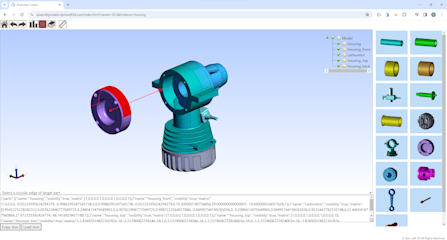
Overview
This demo introduces a unique workflow using HOOPS Visualize for Web (formerly HOOPS Communicator) that loads parts from a parts list and constructs an assembly model using custom mate operators such as collinear, concentric and coplanar. This workflow can be utilized in various industries such as maintenance manuals, work instructions, e-commerce custom orders, etc.
The created assembly structure can be represented in a JSON string and reproduced.
A detailed description of how this demo was implemented can be found in this forum post.
How to Use (Demo Walkthrough Video)
Explore HOOPS Visualise for Web
This demo was created using HOOPS Visualize for Web (formerly HOOPS Communicator).
Reference the HOOPS Visualize for Web (formerly HOOPS Communicator) Documentation.
Sign up for a free evaluation.
Jump straight into coding with the 3D Sandbox
Join our Community Forum
Questions or Feedback?
We are looking for feedback and how this toolkit can be improved to meet your needs! Please connect in our forum.
You can also sign-up for a 60-day trial of the HOOPS Web Platform.

Need to contact us? Email us at labs@techsoft3d.com.